Architecture
This deployment ships OpenZiti controller events into Microsoft Sentinel over a push-based, PaaS-only pipeline. This page explains why it is shaped that way and what each component is doing.
The failure modes hit while building and running this live in troubleshooting.md.
Why push-based
OpenZiti's controller emits a structured JSON event stream, but its event handlers only write to a file, to stdout, to a generic AMQP 0-9-1 broker, or - from v2.0 - to Azure Service Bus. There is no native syslog emitter and no HTTPS push. That constraint drives the design:
- A file or stdout handler would need a host log agent (the Azure Monitor Agent) plus a Data Collection Rule reading a tailed file. That is more moving parts on the controller host and more assurance surface.
- The v2.0
servicebussink lets the controller push events directly into a managed queue, with no host agent and no log-file plumbing. The queue also provides durable buffering: if the downstream Function is briefly unavailable (for example while a fresh role assignment propagates), events wait in the queue rather than being lost. - Everything downstream of the controller is managed Azure PaaS, so there is no VM to patch in the ingestion path.
Data flow
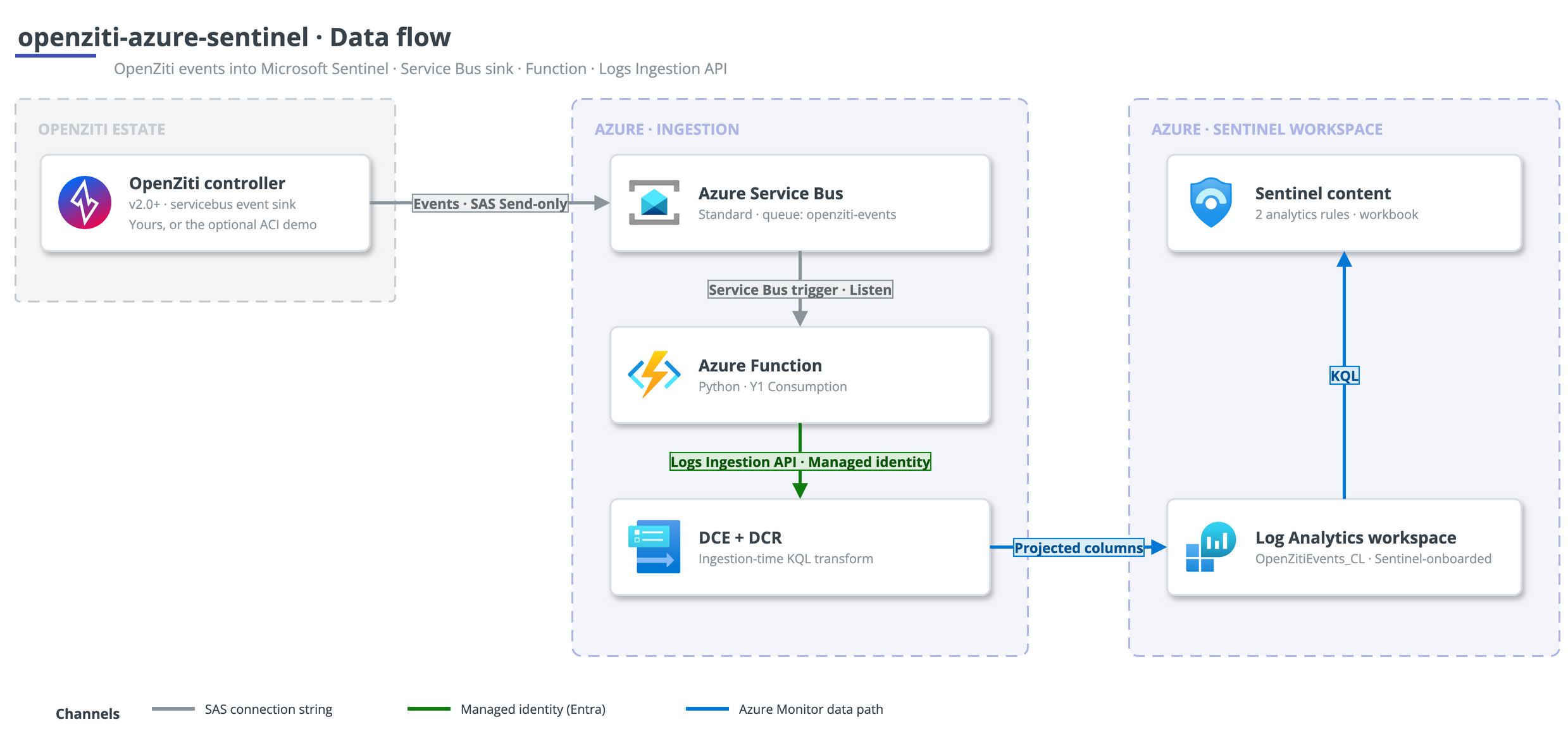
The controller's servicebus sink authenticates with a Send-only SAS rule and
writes JSON events to the openziti-events queue on a Service Bus Standard
namespace. An Azure Function (Python, Y1 Consumption) is triggered by the queue
over a Listen-only connection string, and forwards each event to the Azure
Monitor Logs Ingestion API using its system-assigned managed identity, which
holds Monitoring Metrics Publisher on the Data Collection Rule. The event
reaches the DCR through the Data Collection Endpoint, an ingestion-time KQL
transform projects the columns, and the row lands in the OpenZitiEvents_CL
custom table in Log Analytics. Two scheduled Sentinel analytics rules and a
workbook read from that table.
Component rationale
Service Bus
Standard tier is enough: the queue only needs plain queueing and durable
buffering, not the Premium features. Two separate SAS authorisation rules keep
least privilege on either side of the queue - a Send-only rule for the
controller and a Listen-only rule for the Function. The controller side
must be a SAS connection string because the OpenZiti servicebus sink has no
managed-identity path in the shipped code; it is the one unavoidable shared key
in the design.
Function hosting
The Function runs on a Y1 Consumption plan. Flex Consumption was tried first
and, while it deployed and published cleanly, its host never actually executed
the worker - zero telemetry, and the queue never drained. Y1 consumed the queue
immediately. The Service Bus trigger uses a Listen connection string, not
managed identity, because the Consumption scale controller cannot peek the
queue over a managed identity to scale from zero. The Function's own upload to
the Logs Ingestion API still uses managed identity. The Functions runtime
storage (AzureWebJobsStorage) is a keyed connection string, so that storage
account keeps shared keys enabled.
Ingestion design
The Function is a thin, schema-stable passthrough: it pulls the
event timestamp into TimeGenerated and puts the whole event object into a
RawData dynamic column, then uploads. All column projection lives in the DCR
transform, so the parsed schema can change with a DCR edit and no code change
or redeploy. The transform uses
iif(isnotempty(tostring(x)), tostring(x), tostring(y)) rather than
coalesce(), because the ingestion-time KQL subset does not provide
coalesce(). That pattern is needed to reconcile OpenZiti's mixed casing: most
namespaces use event_type (snake_case) while entityChange uses eventType
(camelCase).
Custom table
The OpenZitiEvents_CL table is created with the azapi provider, because
azurerm cannot create a Log Analytics custom table (its table resource only
manages plan and retention on tables that already exist).
Demo controller on ACI
The self-contained demo runs a real OpenZiti v2.0 controller so the pipeline can be proven end-to-end against genuine events. It runs on Azure Container Instances, not a VM, for two reasons: it removes any VM dependency, and some subscription offers restrict small VM SKUs entirely (see the troubleshooting notes), which would block a VM-based demo outright.
Running the ziti-controller image on ACI has one sharp edge: its persistent
state cannot live directly on the Azure Files (CIFS) mount. ziti's PKI store
hard-links the intermediate CA bundle (os.Link), which CIFS does not support,
and the bbolt/raft database uses mmap, which is unsafe over CIFS. So bootstrap
runs on container-local disk, and only an identity snapshot (PKI + config) is
copied to the Azure Files share. The snapshot uses cp -rL (dereferencing the
hard links) and copies config.yml last - it is the sentinel the restore
branch keys on, so a half-written snapshot is retried rather than restored on the
next start. An event-gen sidecar makes one successful and one failed admin
login per minute against the edge management API, so real authentication
events (success and failure) flow with no routers and no data plane.
Analytics rules
The two scheduled rules take their names from the per-deploy random suffix (for
example openziti-auth-failure-spike-<suffix>). Sentinel keys a rule's ID on its
name and holds a deleted ID in a cooldown, so suffixing the names means a
redeploy never collides with a just-deleted rule. Both rules depends_on the
custom table: they only reference the table inside a KQL string, not as a
resource, so without the explicit dependency Terraform would schedule them before
the table exists and Sentinel would reject the query.
Targeting an existing workspace
With create_workspace = false and a workspace_resource_id, the pipeline
writes into an existing central Sentinel workspace instead of creating one.
Terraform then never creates, modifies, or destroys that workspace; it only
adds the custom table, DCE, DCR, analytics rules, and workbook. Two constraints
apply in this mode:
- Retention. The custom table's total retention must be >= the target
workspace's retention, or the table create fails with a 400. Set
retention_in_daysto match or exceed the workspace. - Permissions. Creating the DCR role assignment needs
Microsoft.Authorization/roleAssignments/write, which Contributor does not include. Grant User Access Administrator or Owner on the scope alongside Contributor.
Lifecycle
deploy.shrunsterraform applywith bounded retries (a redeploy soon after a teardown hits short post-teardown cooldowns), then publishes the Function code with its own retries for RBAC propagation.verify.shresolves the workspacecustomerIdGUID (the Log Analytics query API wants the customerId, not the ARM resource ID) and runs a KQL summary of landed events by namespace and type.teardown.shrunsterraform destroy, purges any soft-deleted workspace of the same name, and gates its success onaz group existsactually reporting the resource group gone - so it never claims a clean teardown that left resources behind.
Each script has a PowerShell twin (deploy.ps1, verify.ps1, teardown.ps1)
with the same behaviour, for Windows users.
Out of scope
This is a reference deployment to adapt, not a hardened production topology. It does not cover HA or multi-region controllers, private networking hardening (private endpoints, VNet-integrated Function), or expanding the log sources beyond the OpenZiti controller event stream. Those are the graduation path once the pipeline is adopted.